At Asia Media Studio, we've spent enough time inside Framer to know exactly why it works, and why we became an official Framer partner rather than just another agency that "also supports" it. This article breaks down what actually makes Framer different, backed by the platform's latest updates, independent reviews, and real performance data, not just marketing copy. It's a long read on purpose, because "why we like this tool" deserves more than a bullet list, it deserves the actual evidence.
If you want a shorter primer first, we've also covered what Framer is and why it's become one of the best website design tools in a more compact guide, and looked separately at why it became a no-code powerhouse for modern web design as the platform evolved. This piece goes further into the design side specifically.

A Design-First Tool Built the Way Designers Actually Think
Most website builders start from the structure of the web: divs, grids, breakpoints, stylesheets. Framer starts from the canvas. If you've ever used Figma or Sketch, opening Framer feels immediately familiar: an infinite canvas, a layers panel, a properties panel, and shapes you can move, resize, and style with your eyes rather than a syntax reference.
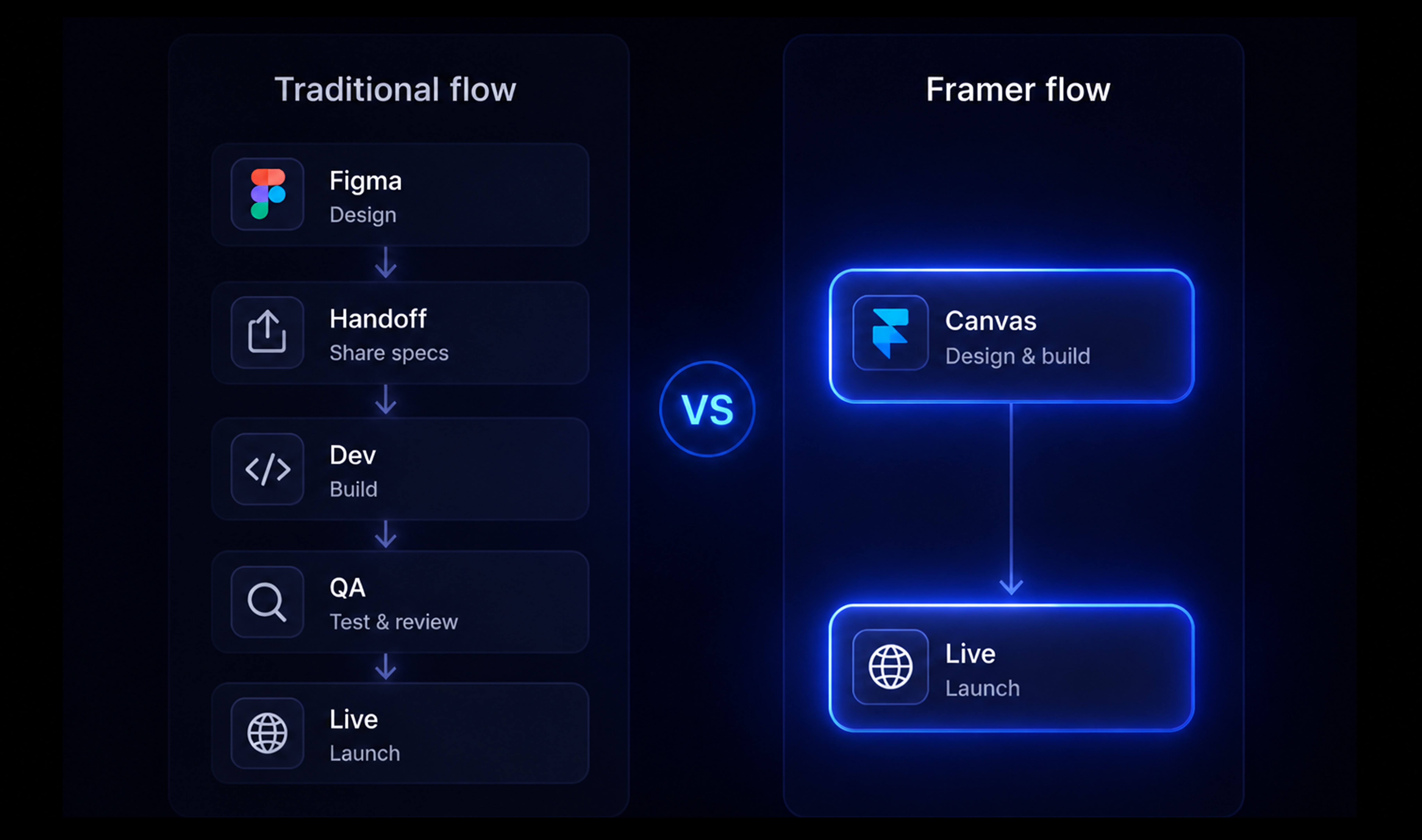
The difference is that in Framer, that canvas is the actual website. There's no separate "design file" that later gets rebuilt by a developer, and no gap between what you designed on Monday and what visitors see on Friday. What you place on the canvas is what publishes, pixel for pixel.
This matters more than it sounds. On a traditional build, a designer might spend a week perfecting spacing, type rhythm, and hover states in Figma, only to watch half of that nuance get lost or reinterpreted once it's coded. Framer removes that layer of translation entirely, which is a big part of why the platform has earned a reputation, as one industry review put it, for being "relentlessly designer-friendly" in a way that WordPress and even Webflow aren't quite built for. Web Designer Depot sums up the philosophy bluntly: Framer is a tool built on "no divs, no grids, just shapes, layers, and instant previews," where beauty is treated as the priority rather than a constraint to be managed around. If you're still weighing platforms at a more basic level, we've broken down How Webflow and WordPress actually differ in a separate guide.
For a design studio like AMS, that's the whole point. We're not choosing Framer because it's easy. We're choosing it because it lets the actual craft of design, typography, spacing, color, rhythm, survive all the way to the live site.
Real Design Freedom, Without Losing the Developer's Precision
"No-code" tools have a reputation for being restrictive once you go past the template. Framer is one of the few that manages to offer genuine creative freedom, not just easy customization within someone else's rigid framework.
Inside Framer, you get full control over typography, motion, interaction states, and responsive behavior directly on the canvas, with real-time previews as you work. Components can be built once and reused across a site while still allowing page-by-page customization, so a brand's visual system stays consistent without becoming a straitjacket. Framer's own positioning for agencies leans into this directly, describing the platform as giving teams the ability to "keep full control over typography, motion, interactions, and responsive layouts with the visual design canvas" while still working inside a system that scales. Framer
This is also where Framer distinguishes itself from template-driven builders. A template is a starting point, not a cage. You can start from one of Framer's professional templates to save time, then rebuild it into something that looks nothing like the original, which is very different from tools where "customization" means swapping a logo and a color. That freedom only pays off, though, when it's grounded in real research rather than guesswork, which is why we treat UX research as a critical part of every website project before a single screen gets designed, a process our UX/UI design team runs on every build.
Templates and the Marketplace: A Head Start, Not a Shortcut That Traps You
It's worth spending a little more time on templates, because this is one of the more misunderstood parts of Framer. Framer runs an active community marketplace where independent creators publish and sell templates, plugins, and components, and Framer publishes its own guidance for template authors on structuring projects properly so they hold up when someone else builds on top of them. Framer
For a studio, this ecosystem is genuinely useful in two different ways. First, it means a client project can start from a professional, well-structured foundation instead of a blank canvas, which saves real hours on early-stage layout decisions. Second, because Framer templates are built with the same components and Auto Layout system as everything else in the platform, a template isn't a dead end the way a theme often is in other builders. You can strip it down to the studs and rebuild the parts that matter for a specific brand, while keeping the underlying structure sound. The marketplace also includes plugins that extend what the platform can do out of the box, from SEO helpers to e-commerce connectors, which we'll get into shortly.
Motion Isn't a Plugin Here, It's Built Into the DNA
If there's one feature that separates Framer from almost every other website builder, it's how seriously the platform treats animation. On most platforms, motion is an afterthought: a plugin, a third-party script, or a checkbox that triggers a generic fade. In Framer, interaction and animation are core to how the tool works.
Framer includes a visual animation editor for hover states, click events, scroll-triggered reveals, and page transitions, all built without writing a line of JavaScript. Scroll-based storytelling, parallax effects, and layered micro-interactions that would normally require custom development are assembled visually, the same way you'd assemble the layout itself. As one 2026 review of Framer versus its competitors put it, Framer is "the only builder that truly respects motion and rhythm as first-class citizens," where animations "feel native, because they are." Web Designer Depot
Framer 3.0, released in mid-2026, pushed this further with interactive shaders, real-time visual effects like cursor-responsive ripples on images and logos, again without custom code. For brands that live and die on first impressions (which, in our experience, is most brands), this is the difference between a site that looks finished and a site that feels alive.
The 2026 AI Layer: Framer Stopped Being Just a Design Tool
This is where Framer has changed the most in the last year, and it's worth spending real time on because most comparisons of design tools haven't caught up yet.
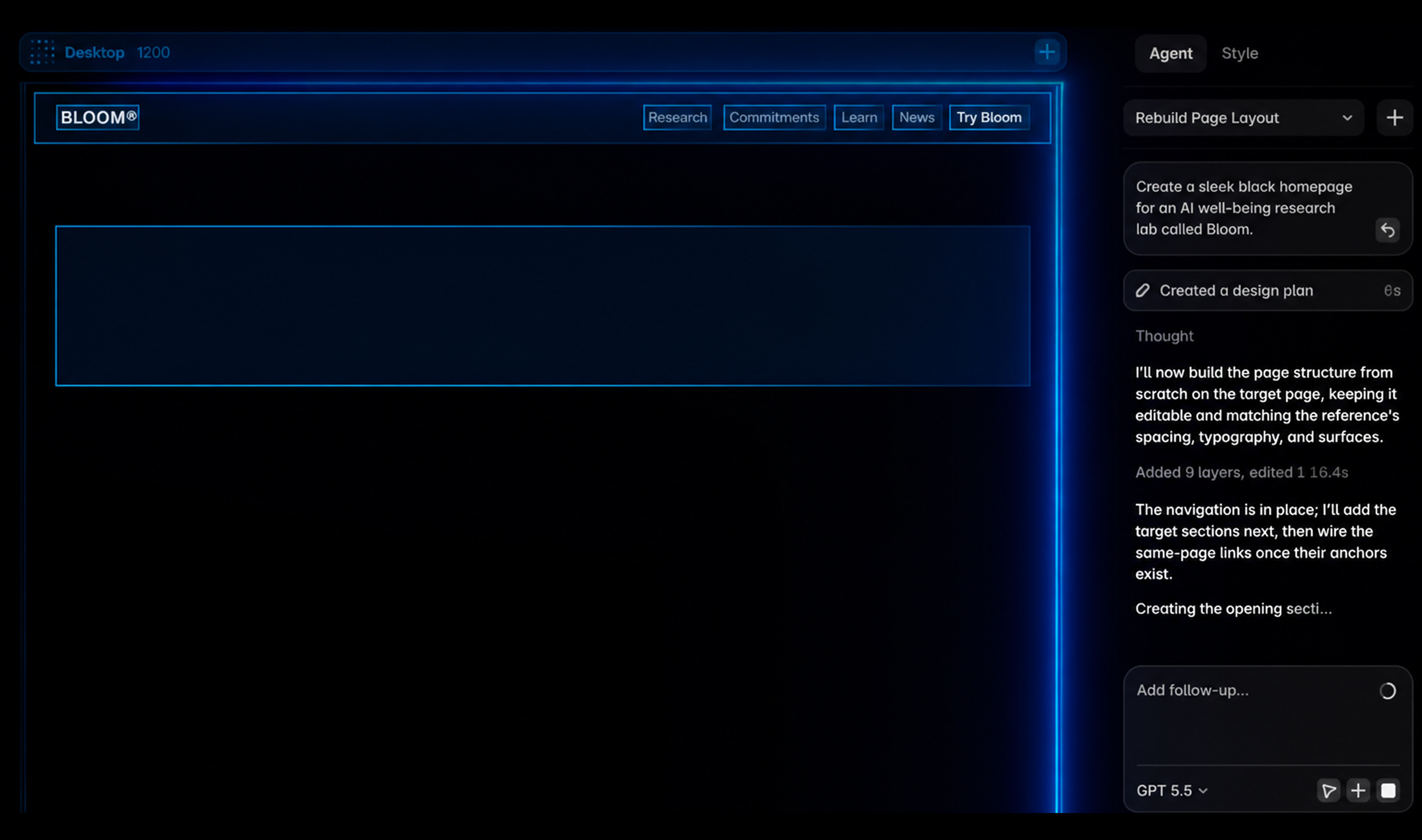
Framer 3.0 introduced AI Agents that operate directly inside the design canvas. Instead of describing what you want in a separate chat window, you can ask an agent to build a page, fix a layout, update CMS content, or write copy, and the agent already has context on your fonts, colors, components, and existing layout because it's working inside your actual project. It's a meaningfully different experience from bolting a chatbot onto a website builder after the fact.
A few of the specific tools worth knowing about if you're evaluating Framer seriously:
Workshop generates custom interactive components from a plain-language description, using Claude 4.5 under the hood, and automatically inherits your project's existing fonts and colors so the output doesn't look like it was dropped in from somewhere else. Wireframer takes a text prompt and generates a full page structure, sections, layout, and placeholder copy, which is genuinely useful for the earliest, roughest stage of a client concept before real design work begins. Framer MCP lets you connect your own AI assistant (Claude, Cursor, and similar tools) directly to a live Framer project to manage CMS entries at scale or run a full technical SEO audit, work that one reviewer noted "would have taken an hour and a half" to do manually. Oma-Kase Branching, meanwhile, gives teams a safe sandbox to test a significant redesign without touching the live site, then merge it in once it's approved, borrowing a workflow that will feel familiar to anyone who has used version control in software development.
None of this replaces a designer's judgment, and it shouldn't. But it does compress the distance between an idea and a working draft, which changes how fast a studio can iterate with a client in the room. It's the same balance we described in how AI changed the way we work without replacing the work itself: the tools move faster, the judgment calls still sit with a person.

The Design Actually Loads Fast, Which Most "Design-First" Tools Struggle With
A beautiful site that loads slowly isn't actually a beautiful site, it's a beautiful bounce rate. This is historically where design-forward tools have struggled, since rich animation and heavy visuals tend to fight against performance.
Framer's own published benchmarks put typical sites at a 1.1 second Largest Contentful Paint, a 95 millisecond Interaction to Next Paint, and a Cumulative Layout Shift of just 0.01, numbers that sit comfortably inside Google's "good" thresholds for Core Web Vitals. Framer That's backed by real infrastructure work, not just a claim: static site generation combined with an edge CDN, automatic image optimization that converts assets to WebP and AVIF (with documented savings around 27% in file size on real projects), predictive preloading that quietly fetches likely next pages before a visitor clicks, and JavaScript bundling improvements that have taken real sites from dozens of separate script chunks down to a fraction of that, cutting load times dramatically in documented before-and-after cases.
For a brand, this translates into something very concrete: you don't have to choose between a site that looks premium and a site that performs. Framer was built to let you have both. This is the same argument we make in why a great product website is built on data, design decisions and performance decisions aren't actually separate conversations.
What It Actually Costs to Build and Run a Site on Framer
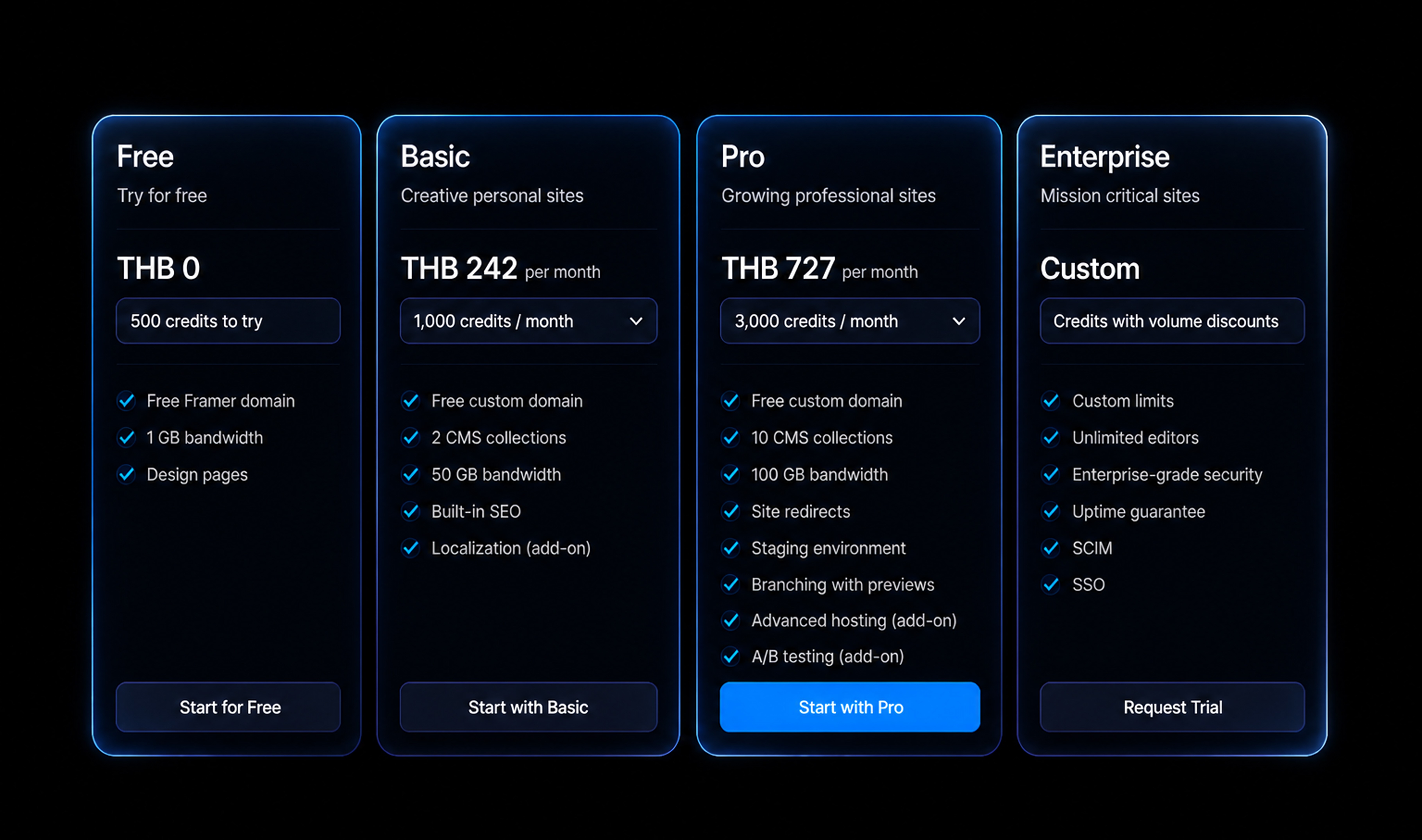
Part of being upfront with readers means talking plainly about price, so here's where the plans stand in 2026. Framer's Free plan supports up to 1,000 pages in design mode with 10 CMS collections and up to three editors, though it only publishes to a Framer subdomain rather than a custom domain, which makes it fine for testing but not for a real launch. The Basic plan, at roughly 10 USD a month billed annually, adds a free custom domain, 30 published pages, and 10 GB of monthly bandwidth for up to two seats. Pro, at around 30 USD a month annually, is where most real business sites land: 150 pages, 10 CMS collections with up to 2,500 items each, a staging environment with instant rollbacks, site redirects, role-based permissions, and 100 GB of bandwidth across up to 10 seats. Scale, at roughly 100 USD a month on an annual plan, is built for larger content operations, with 20 CMS collections holding up to 40,000 items, 200 GB of bandwidth (expandable to 2 TB), access to 300-plus CDN locations, and support for up to 20 translated locales. Enterprise pricing is custom and adds a dedicated account manager and enterprise-grade security controls. No Code MBA
A detail worth knowing before you budget a project: as of Framer 3.0, seat pricing for additional editors dropped from 40 to 20 USD a month, and every paid plan now includes the AI design tools and global CDN hosting by default rather than as a separate add-on. For most brand sites and marketing pages, that means the total cost of "design tool plus hosting plus CDN plus staging" collapses into a single, predictable line item instead of the five or six vendor invoices a traditional stack usually produces.
Where Framer Is the Right Choice, and Where It Genuinely Isn't
We'd rather be straightforward about this than let a client find out the hard way six months into a project.
Framer is an excellent fit for brand sites, product marketing pages, SaaS landing pages, portfolios, and content-driven sites like blogs or resource hubs. One review of Framer for SaaS marketing sites summed up the appeal well: "Framer sites consistently score high on Google PageSpeed Insights out of the box," and because hosting, CMS, and SEO basics are all native to the platform, teams can focus on the product story instead of managing "separate hosting providers, third-party CMS systems, and plugin conflicts." LaunchNow
E-commerce is the area that needs the most honest framing. Framer can absolutely support commerce work: pixel-level control over product pages, variant selectors, dynamic pricing displays, and integrations like Framer Commerce that sync product data, inventory, and pricing directly from Shopify, alongside payment gateway connections to Stripe and PayPal. Sites built this way can handle serious scale, with documented cases of stores on this stack handling well over a million unique visitors. Goodspeed Studio But it's a real trade-off, not a free upgrade: Framer isn't built for large catalogs (most guidance points to curated catalogs under roughly 200 products working best), it lacks native advanced inventory management and global tax calculation, and running commerce this way typically means managing Framer and Shopify as two connected platforms rather than one. For a boutique or design-led brand with a focused product line, that trade-off is usually worth it for the design quality gained. For a large multi-category retailer, a dedicated commerce platform is still the more sensible foundation.
The same honesty applies to complex membership platforms, heavily gated content systems, and anything requiring deep custom backend logic, these are still better served by traditional development. Framer's sweet spot is anywhere the website itself is a design and brand asset first, and a transactional engine second, if at all.
The Learning Curve: Who Framer Is Really Built For
Framer gets marketed as no-code, and it is, but "no-code" and "no learning curve" aren't the same thing, and pretending otherwise wouldn't do you any favors.
Independent testing in 2026 found that most newcomers can publish a usable site within three to five hours, especially when starting from a template or using AI generation to get past the blank-canvas stage, with a full weekend generally enough to get comfortable with canvas editing, Auto Layout, and the CMS. The honest verdict from one hands-on review: "Framer is genuinely one of the best website builders for beginners who want a professional result without writing code, as long as they can tolerate a short but real learning curve." GetClarityHub The same review notes that people coming from a design background, particularly Figma, tend to adapt "in hours, not days," since so much of Framer's interface logic borrows directly from tools designers already know.
This is a meaningful data point for anyone deciding whether to build a site in-house or bring in a partner. Framer rewards design fluency more than technical fluency, which is precisely the profile of a studio team versus a generalist trying to also run a business. It's also why AI generation tools inside Framer, which can produce a rough multi-section layout in under a minute, have become such a popular way to skip past the intimidating empty-canvas moment for teams still building that fluency.
This is also exactly where bringing in outside help pays for itself rather than feeling like an added cost, and it's worth reading how to brief a creative agency properly if you're weighing that decision, since a clear brief is what determines whether a partner accelerates a Framer build or just adds another layer of back and forth.
Why Agencies Are Actually Moving Their Client Work to Framer
The shift toward Framer among agencies isn't just about the design tools, it's about what happens after a site launches.
Framer includes hosting, SSL, custom domains, staging environments, and version history as standard, which removes an entire category of infrastructure management that used to sit on an agency's plate indefinitely. Clients can be given editing access to their own content without any risk of them breaking the underlying design system, something that used to require careful CMS permission architecture to pull off safely. Review cycles move faster because there's no separate deployment step between "the client approved it" and "it's live." And because branching and staging are built in, teams can separate different client workstreams or test major changes without putting a live site at risk.
Framer describes this directly as giving agencies a way to "give clients a system they can update while protecting the visual direction," while keeping "brand craft, CMS structure, review workflows, client feedback, and publishing" all inside one connected process rather than five disconnected tools. Framer For an agency, that's not just a convenience, it's a fundamentally different cost structure for delivering ongoing client value after launch, which is also why ongoing hosting and maintenance is worth planning for as part of the same relationship rather than an afterthought once a site is live.

SEO: A Genuinely Strong Foundation, With an Honest Caveat
We'd rather tell you the full picture here than oversell it, because that's the kind of studio we want to be.
Framer's technical SEO foundation is solid out of the box. Every site gets an auto-generated and auto-updating sitemap, self-referencing canonical tags, per-page meta titles and descriptions, Open Graph support for clean social sharing previews, and genuinely clean semantic HTML underneath the visual design, which matters more to search engines than most people realize. Framer also includes privacy-first analytics with no cookie banner required, which is a small but real advantage for both compliance and user experience.
Where Framer is more honest about its limits: there's no built-in schema markup interface, so structured data still requires manual code, and there's no native keyword tracking or on-page SEO scoring the way a dedicated WordPress plugin might offer. One detailed 2026 SEO analysis concluded that "Framer earns a strong foundation score for SEO" but that where it "falls short is the active SEO workflow," recommending supplementary tools for teams running competitive keyword campaigns. RankFrame
In practice, this means Framer is an excellent base for a brand site, portfolio, or product marketing page, and teams running heavy content-driven SEO strategies may want to pair it with additional tooling. That's not a flaw so much as a reason to bring in a team that knows how to work around it, which is part of what a good implementation partner should be doing anyway, and it's exactly the gap our SEO services are built to close alongside a Framer build rather than as a separate, disconnected engagement.
The Work Speaks for Itself
Design tools get judged by what people actually build with them, and Framer has earned real recognition on that front. Framer-built sites regularly appear on Awwwards with "Site of the Day" honors and Developer Awards, spanning categories from AI startups to luxury brands to design agency portfolios. Awwwards Framer also runs its own annual Awards program and maintains a curated gallery of standout sites, which has become a genuine source of inspiration for designers rather than just a marketing showcase.
That matters because it answers the obvious skeptical question directly: no, choosing a visual, AI-assisted tool doesn't mean settling for generic output. The ceiling on what's possible in Framer is set by the designer, not the platform.

Built for Brands That Think Beyond One Language
For brands operating across multiple markets, and a lot of the brands we work with at AMS fall into exactly this category, Framer's localization tools are worth a specific mention. The platform supports native multilingual locales, with the Scale plan allowing up to 20 translated locales, alongside an AI Translate feature that can spin up a translated version of a site across more than 100 languages without a full rebuild. For a regional brand expanding into new markets across Southeast Asia, that's the difference between "localization" being a multi-month re-platforming project and being a configuration decision made inside an existing site. It's worth planning for honestly too: each additional AI-translated locale currently carries its own monthly cost, so a five-market rollout is a budgeting conversation worth having early rather than discovering later.
Translating a site into a new language only works if the brand underneath it is solid enough to travel in the first place, which is the point we go into further in our guide to creating strong website branding. A site built beautifully in Framer still needs a brand system worth putting in front of a new market.
Why Asia Media Studio Builds Inside Framer, as an Official Partner
We didn't pick Framer because it was trendy. We picked it because, project after project, it was the tool that let our design work actually survive the trip from concept to live site without losing what made it good in the first place.
As an official Framer partner, Asia Media Studio doesn't just recommend the platform, we build directly inside it for our clients. That partnership status means our team has direct access to Framer's design best practices, early visibility into new features like the AI toolkit covered above, and workflows that let us move from brand strategy to a fully designed, fully live website faster than agencies treating Framer as just one more tool in a disconnected stack.
In practice, that looks like a single connected process rather than a relay race between teams: brand strategy and positioning inform the design system, the design system gets built directly on the Framer canvas rather than handed off to a separate development phase, and the client can see and react to a real, clickable site far earlier than they would with a traditional build. The partnership also means we're not learning Framer's newest features from a blog post at the same time our clients are, we're building with them from the point they roll out.
Two recent AMS projects show what this looks like end to end. Our work on Wa Ale and Doc G were both taken from brand strategy through to a fully live site inside Framer, using exactly the design freedom, motion, and performance foundations covered throughout this article. If you want to see the platform's design potential applied to a real brand rather than described in the abstract, those two projects are a good place to start.
If you're evaluating whether Framer is the right foundation for your brand's next website, or wondering how to translate an existing brand identity into a site that actually feels as considered as the strategy behind it, that's exactly the conversation we'd want to have. You can also see how we structure that process more broadly on our website design and development services page.
Common Questions We Get Asked About Framer
Is Framer only for simple, single-page sites? No. With CMS collections, relational content on the Pro plan and above, and support for over a hundred pages even on entry-level paid plans, Framer comfortably supports multi-page marketing sites, blogs, and content hubs, not just landing pages.
Do we lose our own content if we ever want to leave the platform? Content and structure live inside your Framer project and CMS, and pages export as standard web output, but like any hosted platform, it's worth planning migration paths the same way you would with any SaaS tool. This is a fair question to ask any agency, and we'd rather you ask it upfront.
Can Framer handle a site that needs to scale internationally? Yes, through native locales and AI Translate, though as noted above, each additional locale is a real line item worth planning for rather than assuming is free.
Does using an AI-assisted tool mean the design will look generic or AI-generated? Not if the AI tools are used the way they're intended, as a way to speed up early drafts and repetitive component work, with a designer still making the actual creative decisions. The Awwwards-recognized sites built in Framer are proof that the ceiling is set by the person designing, not the platform.
The Bottom Line
Framer earns its reputation the hard way: real performance data, genuine design freedom, motion that feels native instead of bolted on, and an AI toolkit that's actually integrated into the design process rather than sitting next to it. It isn't the right fit for every project, large-catalog e-commerce, heavily gated membership platforms, and highly technical SEO campaigns still have real trade-offs worth planning around, but for brand sites, portfolios, SaaS marketing pages, and anything where design quality is the point, it's hard to find a tool in 2026 that gets out of a designer's way this completely while still shipping something fast, polished, and production-ready.
That combination, design freedom that doesn't sacrifice performance, and a platform serious enough that studios build entire client practices on top of it, is exactly why Asia Media Studio partnered with Framer rather than simply supporting it as one option among many.


Let’s keep in touch.
Follow Asia Media Studio for design insights and updates on Facebook, Instagram, and LinkedIn.